
( HeyBill Business )
Online invoice maker
create, send & get paid online
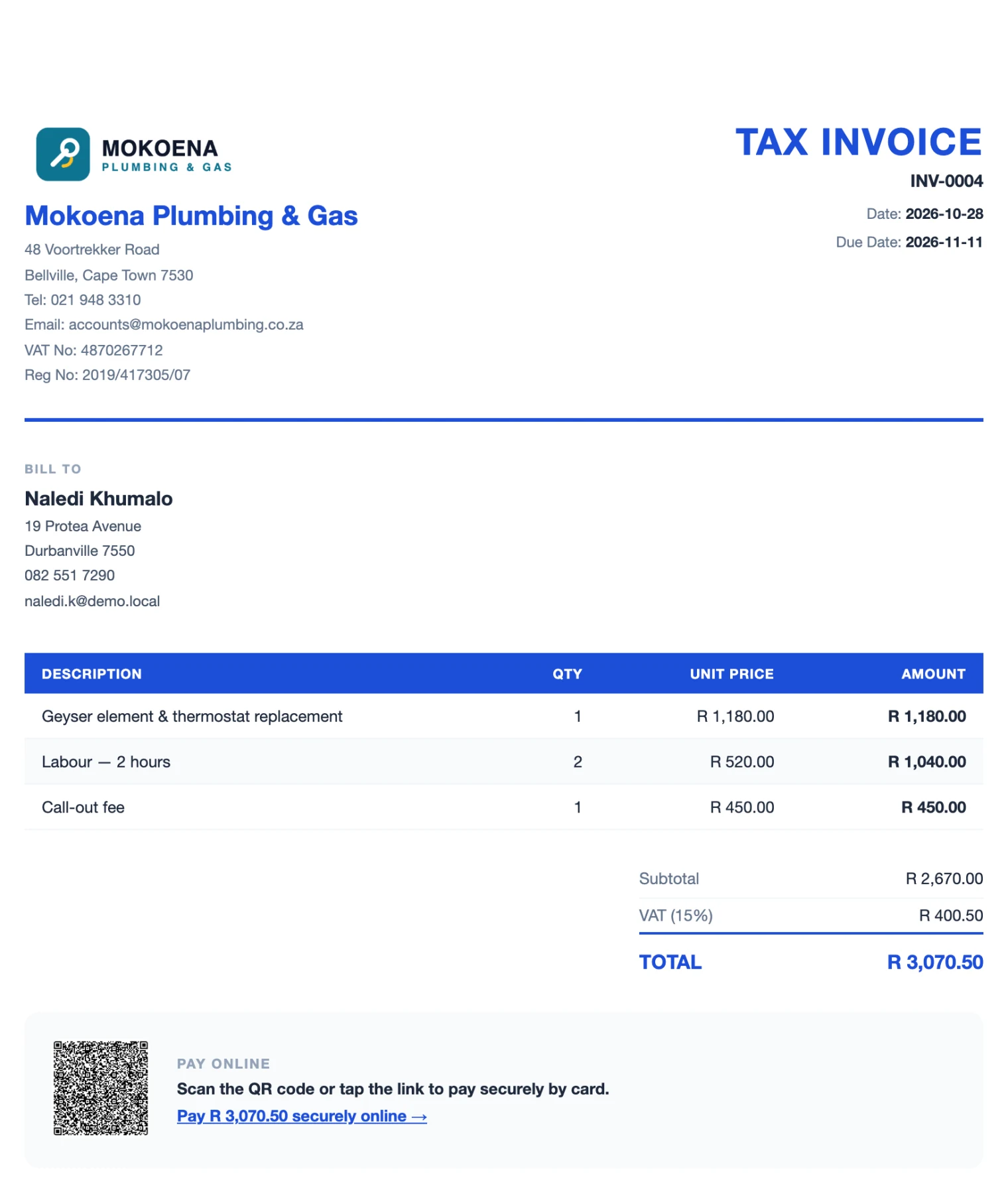
Create professional online invoices and quotes in rand, with 15% VAT, your logo and banking details. Send each one as a secure link on WhatsApp or email — your client can view it, download the PDF or pay it online.
What is an online invoice?
An online invoice is an invoice you create, send and track on the internet instead of in Word, Excel or on paper. Rather than attaching a file and hoping it gets opened, you send your client a secure link. They open the invoice in any browser — on their phone or computer — and can download a PDF copy or pay you by card straight away.
With HeyBill’s online invoice maker, every invoice is numbered for you, totals and VAT are calculated on the server so they always add up, and you can see at a glance which invoices are paid, part-paid or overdue.
Everything your invoices need
Most small businesses still build invoices by hand, renumber them and lose track of who has paid. HeyBill keeps your clients and items, numbers every document and shows you exactly what is outstanding.
( 01 )
Invoices
Automatic numbering with your own prefix (for example INV-0001), due dates, payment terms and notes.
( 02 )
Quotes
Send a quote with a valid-until date. When it’s accepted, duplicate it as an invoice — client and items carry over.
( 03 )
Purchase orders
Order from suppliers with an expected delivery date and delivery terms.
( 04 )
15% VAT & tax invoices
Add VAT per document and show your VAT and company registration numbers. Invoices that charge VAT are titled “Tax Invoice”.
( 05 )
Your branding
Upload your logo and add your address, contact and banking details once — they appear on every document.
( 06 )
Send as a link
Share any invoice on WhatsApp or email as a secure link that opens in the browser. No app or account needed for your client.
( 07 )
Pay online
Connect PayFast or Yoco and add a card payment link and QR code to the invoice.
( 08 )
PDF download
You and your client can download a print-ready PDF of any invoice or quote.
( 09 )
Partial payments
Record deposits and part-payments (EFT, cash, card) and see the balance still owing.
( 10 )
Saved items & clients
Reuse your common line items and pick existing clients instead of retyping them.
( 11 )
Client portal
Each client gets a private page with every invoice and quote you’ve sent them.
( 12 )
Reports
See paid, outstanding and overdue totals, and export a VAT report to CSV for your bookkeeper.
From job done to invoice sent in a minute
-
( 01 )
Pick or add the client
Choose an existing client, or let new clients fill in their own details with your sign-up link.
-
( 02 )
Add the line items
Type them, choose saved items, or describe the job and let the AI draft it.
-
( 03 )
Send the online invoice
Share it on WhatsApp or email as a secure link. Add automatic reminders and a pay-online link if you like.
-
( 04 )
Get paid
Your client pays by EFT or card. Card payments are recorded on the invoice automatically; EFTs you mark as paid in a tap.
( Why online )
Online invoices
vs email attachments
| Word / Excel invoice | HeyBill online invoice | |
|---|---|---|
| Opens on any phone without an app | Sometimes | ✓ |
| Numbering and totals done for you | — | ✓ |
| Client can pay by card from the invoice | — | ✓ |
| Marked paid automatically when paid online | — | ✓ |
| Automatic reminders until it’s paid | — | ✓ |
| See what’s paid and overdue in one place | — | ✓ |
| PDF copy for your records | ✓ | ✓ |
Only need one invoice right now?
Use our free invoice generator or free quote maker — no sign-up, instant PDF.
( FAQ’s )
Online invoicing
questions, answered
Is HeyBill’s online invoice maker free?
Creating a HeyBill account is free and you don’t need a card to sign up. For a single invoice without an account, use the free invoice generator.
Does my client need an account to see the invoice?
No. Your client gets a secure link that opens the invoice in any web browser, where they can download the PDF or pay online if you have payments set up.
Can my client pay the online invoice by card?
Yes, if you connect your own PayFast or Yoco account. HeyBill adds a payment link and QR code to the invoice, and verified payments mark it paid automatically. Your banking details stay on the invoice for EFT.
Can I add my own invoice numbering?
Yes. Set your own prefixes for invoices, quotes and purchase orders in Settings. HeyBill keeps the numbers in sequence for you.
Does HeyBill calculate VAT for me?
Yes. Turn on VAT for a document and HeyBill calculates 15% VAT and the total, and titles the invoice “Tax Invoice”. Totals are always recalculated on the server, so they add up.
Can I send a quote and then invoice for it?
Yes. Send the quote, then duplicate it and switch it to an invoice when the work is approved.
Can I record a deposit or part-payment?
Yes. Record each payment against the invoice and HeyBill shows it as partially paid until the balance is settled.
( Keep exploring )
Ready to
get paid faster?
Create your HeyBill account in under a minute — no card needed.